Console & Network Logon Tracking
Logon Tracking keeps track of both network logons (success and failure) as well console and remote desktop logon sessions on your network. The collected information can be queried through the web reports to obtain logon information and statistics.
Download Now Request a demo
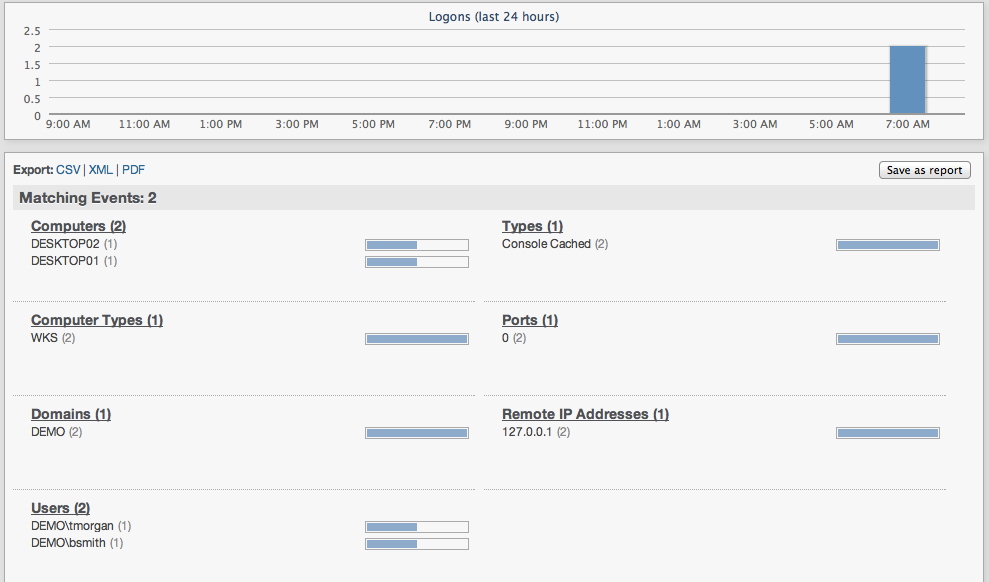
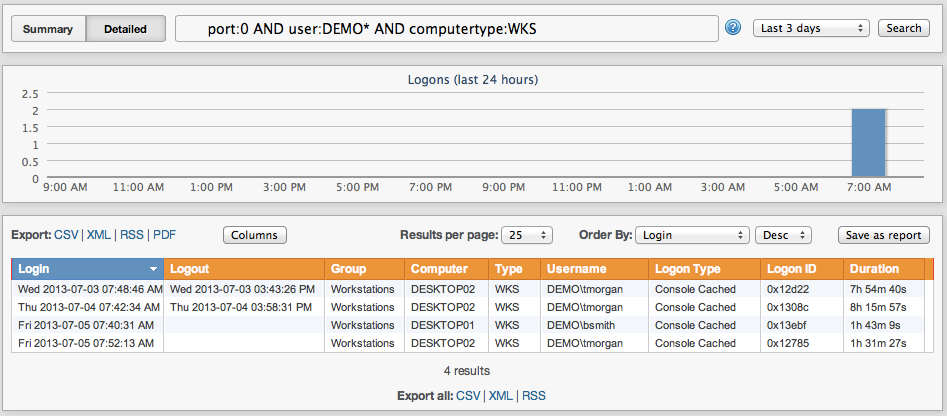
Console Logon Tracking
With the Console Logon Tracking Reports you can view information such as:
- Users that are currently logged on to the network
- All administrative logons
- Where users logged on (computer name)
- Complete logon history of selected users
- How long users are logged on
- Logon statistics for users during certain time periods
- plus more customizable logon queries and reports
Network Logon Tracking
Network logon tracking you can collect a wide variety of information about successful and failed logins on your network and is useful in a wide variety of scenarios, including
- Regulatory Compliance
- Network Security Review
- Troubleshooting
- Network Logon Statistics
For example, you can generate the following reports and statistics about network logons:
- Most common reasons for failed logons
- Servers / Workstations with most failed logons
- Most common logon types (e.g. service, interactive, etc.)
- Protocol distribution (e.g. NTLM vs. Kerberos)
 Event Log Monitoring
 Reporting
 Health Monitoring
 Compliance
 ADMonitor
 Management
 Log File Monitoring
 Network Monitoring
 Environment
 Notifications
 Log Consolidation
 Full Feature List