How do I increase the maximum available memory of the EventSentry Web Reports?
Article ID: 364
Category: Web Reports
Applies to: 3.4 and newer
Updated: 2022-05-20
Open EventSentry Web Reports Properties
Launch
C:\Program Files\EventSentry\WebReports\tools\launchJvmSettings.bat
Update Maximum Memory
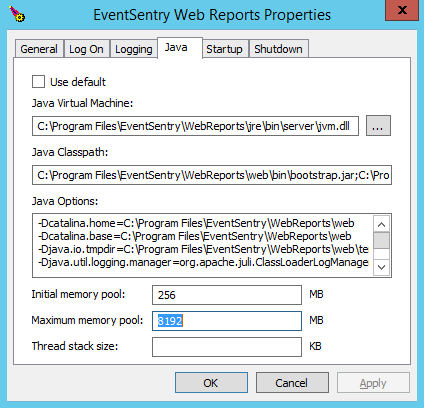
EventSentry Web Reports Properties
- Stop Service
- Click Java tab
- Increase the Maximum memory pool greater than 4096 MB
- General tab > Start service
Additional Options
When increasing the Maximum Memory Pool greater than 4096 MB, please add the following to the Java Options section:
1 |
-XX:+UseG1GC |
Manually open EventSentry Web Reports Properties
If launchJvmSettings.bat is unavailable, you may directly launch the EventSentry Web Reports properties with the commands below:
From the Command Prompt:
cd \Program Files\EventSentry\WebReports\web\bin\ tomcat8w.exe //ES//EventSentryWebReports


